
Cursor, one of the world's most popular AI code editors, confirmed that an attacker published a fake version of the Claude Code extension on its marketplace that installed an SSH backdoor on developers' machines. The extension was live for about 11 hours on October 29, 2026 and, according to Cursor, up to 5,000 users may have received it.
The most interesting part isn't the extension but how it got there: in its November 13 update, Cursor explained that it all began with an access key stolen at Fireworks AI, one of its AI providers. It's a textbook example of how an AI vendor can become the front door into your company.
What happened, step by step
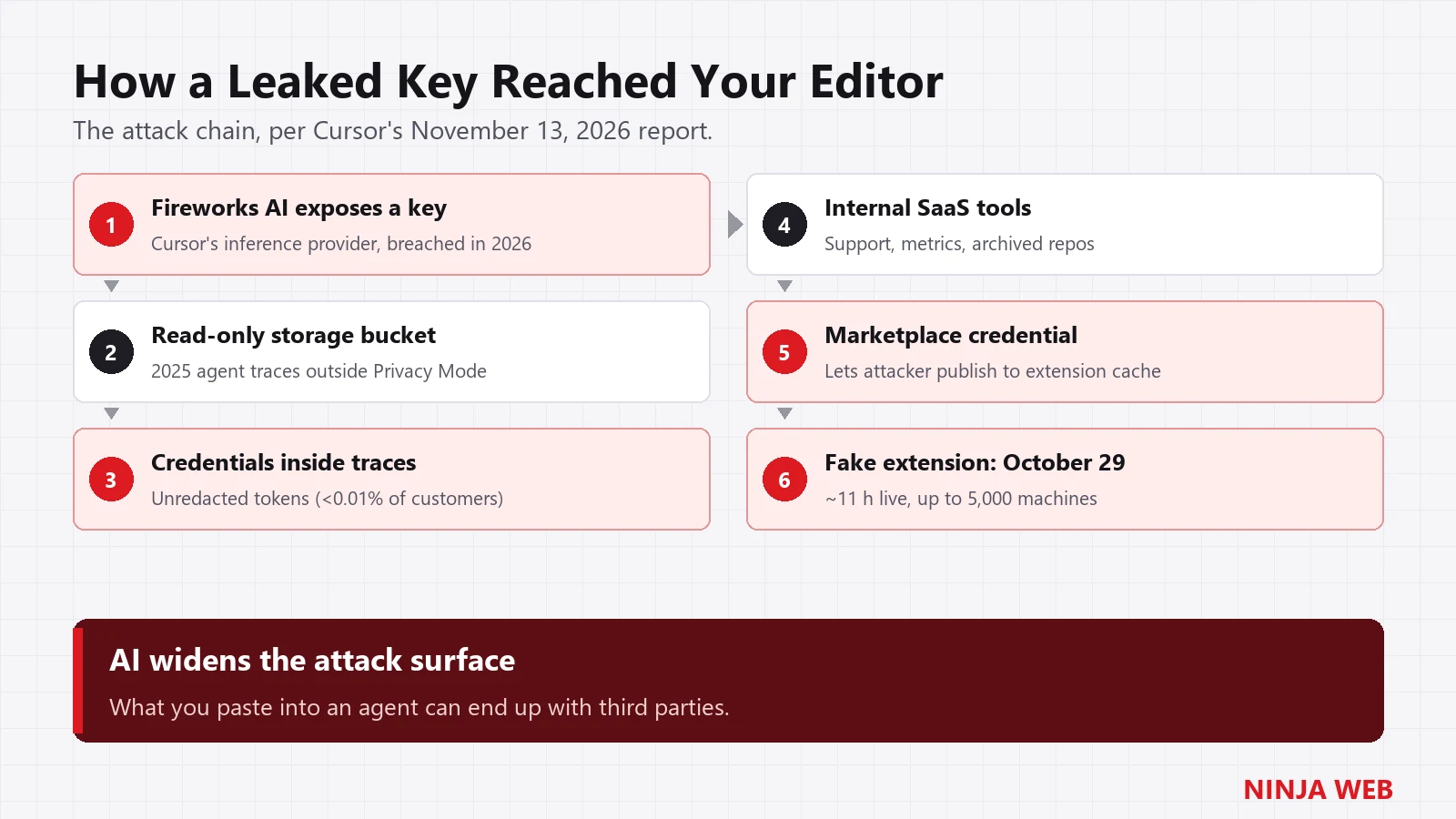
- A key exposed at the vendor. Cursor had issued Fireworks AI an access key to share data. Fireworks suffered security incidents in 2026 and that key was exposed.
- A read-only bucket… full of valuable data. With the key, the attacker copied data from storage Cursor used to share information with Fireworks: coding agent session traces, mostly from 2025, from users who didn't have Privacy Mode turned on. No write access needed: the value was in what was stored.
- Credentials inside the conversations. Some of those traces contained unredacted credentials, meaning passwords and tokens developers had pasted or exposed while working with the agent. Cursor estimates it affected less than 0.01% of its customers.
- Lateral movement. With those credentials the attacker got into some of Cursor's internal SaaS tools (support, usage metrics, archived non-production repositories).
- The marketplace key. Among that data was a Cursor credential that let the attacker publish to the extension marketplace cache.
- The fake extension. On October 29, between 2:27 a.m. and 1:35 p.m. Pacific time, Cursor's marketplace served versions 2.1.312 and 2.1.313 of
Anthropic.claude-codefor macOS and Windows with malicious code added. It used the extension's legitimate ID, so it looked like a normal update.
What did the malicious extension do?
When Cursor started, a small JavaScript loader ran before the extension's real code and:
- Sent machine details to the attacker: host and user name, operating system, working folders, environment variable names, the configured Git email and the public IP.
- Added the attacker's SSH key (commented
svc-telemetry) toauthorized_keys. - Tried to enable the SSH server and open a reverse tunnel to an attacker server, to reach the machine even behind a firewall.
- Persisted on the machine: a LaunchAgent on macOS or a scheduled task on Windows that retried the connection every 60 seconds.
Cursor notes that enabling SSH requires admin rights and likely failed on most machines, and that the attacker's server is now offline. But it also warns that the key, the persistence and the data upload did run, and that uninstalling the extension isn't enough: the persistence scripts keep running on their own.
What was NOT affected
- Anthropic was not hacked. The fake extension wasn't built by Anthropic and isn't a Claude Code vulnerability.
- According to Microsoft Threat Intelligence, the malicious package was never published to Microsoft's Visual Studio Marketplace or to the
@anthropic-ai/claude-codenpm package. Nor to Open VSX. - Cursor says customer code, Privacy Mode data, the Cursor app and its official updates (no signing keys were exposed), and other marketplace extensions were not compromised.
Am I affected? How to check
You're affected if you installed or updated the Claude Code extension inside Cursor on macOS or Windows on October 29. If you use Claude Code in the terminal or in VS Code, you're not.
- Look for the attacker's key. On macOS or Linux:
On Windows (PowerShell):grep -s svc-telemetry ~/.ssh/authorized_keys && echo "AFFECTED"
IfSelect-String -Pattern svc-telemetry -Path "$HOME\.ssh\authorized_keys","C:\ProgramData\ssh\administrators_authorized_keys" -ErrorAction SilentlyContinuesvc-telemetryshows up, the machine is compromised. - Check the installed version (Cursor's command-line tool accepts the same options as VS Code's):
Having a different version today doesn't rule out having had 2.1.312 or 2.1.313 that day: the SSH key is the best signal.cursor --list-extensions --show-versions | grep -i claude-code - Look for these traces on the machine and in your security tools (EDR, firewall, proxy):
System Traces left by the malicious extension All SSH key with the comment svc-telemetryinauthorized_keys; connections to134.209.82.225(ports 22 and 8099)macOS ~/Library/LaunchAgents/com.apple.sysmond.plist,~/.config/.smt,~/.config/.smtk,.stk_*files in$TMPDIRWindows Scheduled task SysMon(runs as SYSTEM),%USERPROFILE%\.config\smt.cmd,sysmon.cmdin the Startup folder,.stk_*files in%TEMP%Linux @rebootcron entry running~/.config/.smt,/tmp/.stk_*files
If you found the key: what to do
- Isolate the machine from the network before anything else.
- Keep a copy of the suspicious files if you plan a forensic review.
- Run the official cleanup scripts Cursor published in its notice (one for macOS, one for Windows). They remove the extension, persistence, tunnels and the attacker's key, and tell you if anything is left.
- Rotate every credential reachable from that machine: SSH keys, GitHub or GitLab tokens, cloud keys (AWS, Azure, Google Cloud), AI API keys,
.envfiles, browser sessions. Do it from a different, trusted machine. - Consider reinstalling the system if there are signs the attacker actually used the backdoor.
The lesson for any business using AI
This incident didn't start with a virus or a phishing email. It started with what developers typed into an AI agent: stored conversations, shared with a vendor, that contained passwords. Three things worth doing now:
- Never paste secrets into an AI chat or agent. Use environment variables or a secrets manager, and turn on whatever privacy mode the tool offers (in Cursor, Privacy Mode).
- Ask your AI vendors what they store, who they share it with and for how long. Every intermediate provider is one more link in your supply chain.
- Scan for secrets in your repositories and logs, and rotate credentials regularly. A password that no longer works is worthless when it leaks.
It's the same logic as the Optimizely attack we covered a few days ago: attackers no longer go straight at you, but at the tools you trust.
Frequently asked questions
Is Claude Code safe?
Yes. Anthropic wasn't breached, and the official extension on the Visual Studio Marketplace and npm never contained the malicious code. The problem was a tampered copy distributed from Cursor's marketplace.
Which versions were infected?
Versions 2.1.312 and 2.1.313 of Anthropic.claude-code downloaded from Cursor's marketplace for macOS and Windows between 2:27 a.m. and 1:35 p.m. Pacific time on October 29, 2026.
Is uninstalling the extension enough?
No. The extension leaves persistence scripts and an SSH key that stay active after you remove it. You need to clean the machine and rotate credentials.
How many people were affected?
Cursor estimates that at most 5,000 users may have received the malicious version. That's an upper estimate, not a count of confirmed compromised machines.
Does your team code with AI?
At NINJA WEB we help businesses adopt artificial intelligence safely: usage policies, secrets handling, vendor reviews and incident response. Learn about our cybersecurity services too, or contact us if you need your machines checked.
Sources: Cursor (October 29 notice), Cursor (November 13 update), SecurityWeek, GitGuardian, GCN.